> ## Documentation Index
> Fetch the complete documentation index at: https://docs.p2w.lol/llms.txt
> Use this file to discover all available pages before exploring further.
# Auto Messages
Schedule messages to be sent at an interval.
You can only have **one** auto message per channel, and the interval must be at least **10 minutes**.
## Creating an auto message
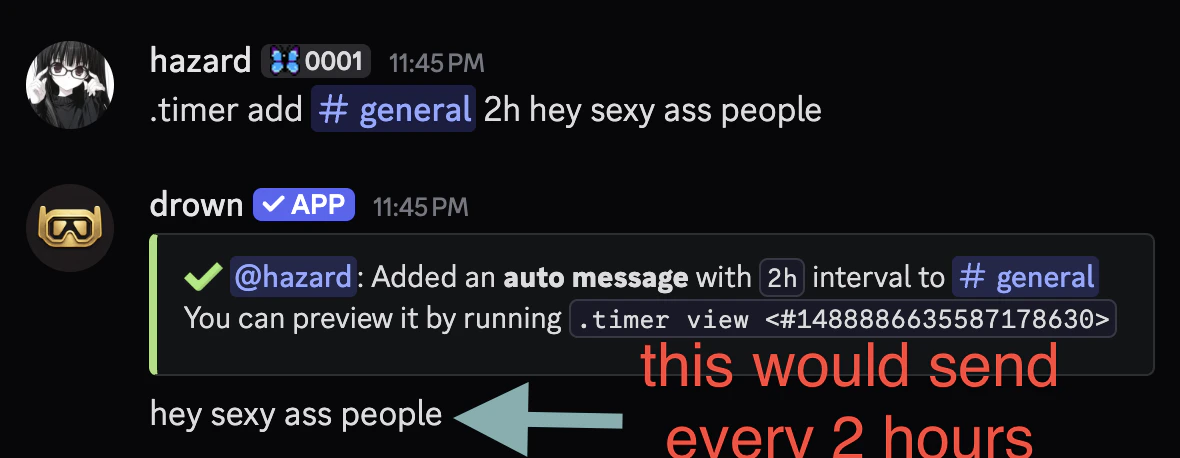
You can create an auto message with the `timer add` command.
The `message` parameter can be raw text or an **embed** with dynamic **variables**.
```typescript Syntax theme={null}
.timer add (channel) (interval) (message)
```
```typescript Example theme={null}
.timer add #general 2h hey sexy ass people
```
 ## Removing an auto message
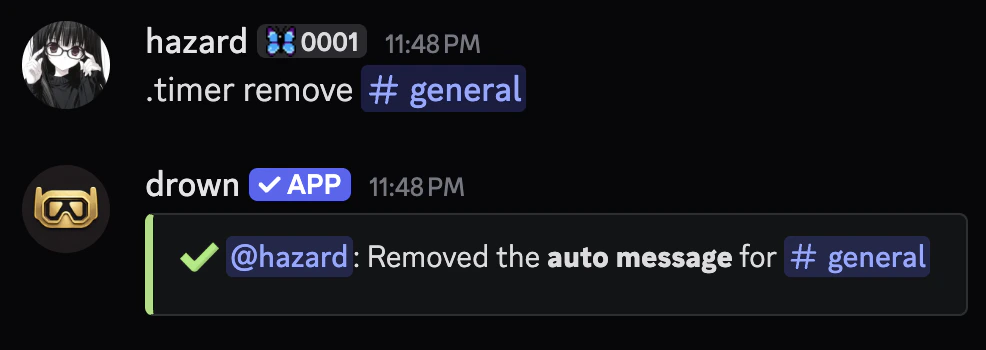
You can remove an auto message with the `timer remove` command.
```typescript Syntax theme={null}
.timer remove (channel)
```
```typescript Example theme={null}
.timer remove #general
```
## Removing an auto message
You can remove an auto message with the `timer remove` command.
```typescript Syntax theme={null}
.timer remove (channel)
```
```typescript Example theme={null}
.timer remove #general
```
 ## Related commands
You can use the `timer view` command to view auto message.
```typescript Syntax theme={null}
.timer view (channel)
```
```typescript Example theme={null}
.timer view #general
```
You can use the `timer list` command to view all auto messages.
## Related commands
You can use the `timer view` command to view auto message.
```typescript Syntax theme={null}
.timer view (channel)
```
```typescript Example theme={null}
.timer view #general
```
You can use the `timer list` command to view all auto messages.