> ## Documentation Index
> Fetch the complete documentation index at: https://docs.p2w.lol/llms.txt
> Use this file to discover all available pages before exploring further.
# Fake Permissions
Restrict moderators to only use drown for moderation.
### Why use fake permissions?
Fake permissions negate the possibility of a rogue moderator using a script which floods the **Discord API** and mass bans all members, or any other harmful action. It’s a security measure which ensures that your server can’t be nuked whatsoever.
### How do fake permissions work?
When a moderator is given fake permissions, such as `ban_members`, they will be able to use the `ban` command with **drown**, but they won’t be able to use the native **Discord** ban feature.
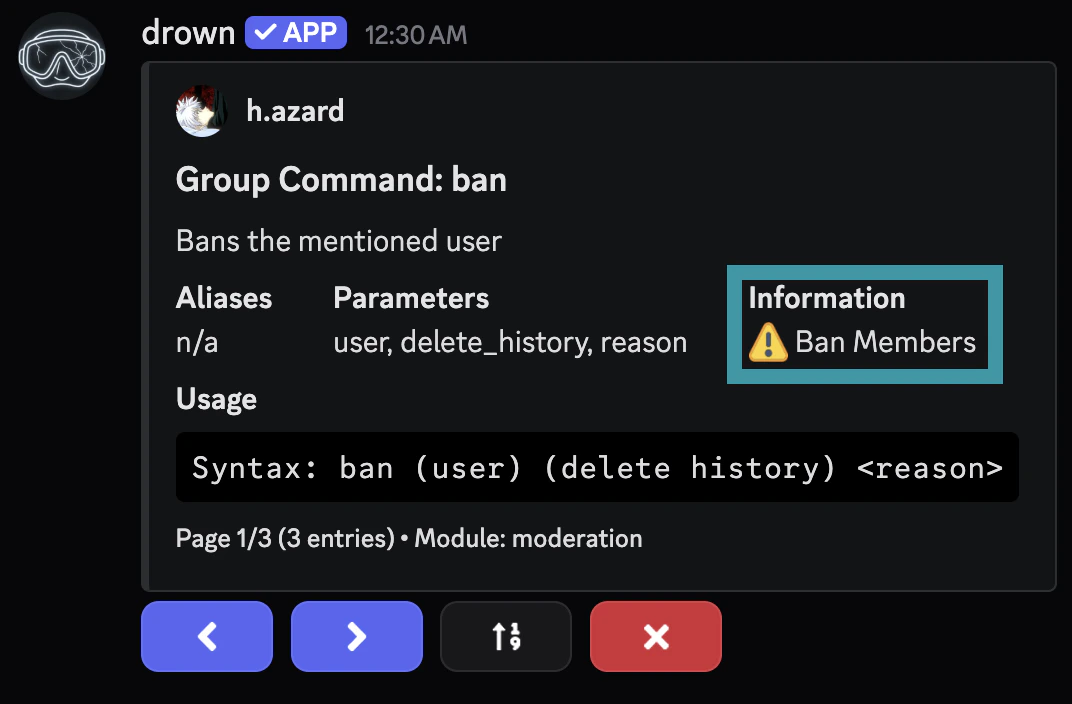
### Getting command permissions
You can locate the required permissions for a command with `.help (command)`.
 ### Setting up fake permissions
The following commands can only be used by the **server owner**.
Use the `fakepermissions add` command to grant a fake permission to a role.
```typescript Syntax theme={null}
.fakepermissions add (role) (permissions)
```
```typescript Example theme={null}
.fakepermissions add @admin ban_members, kick_members
```
Use the `fakepermissions remove` command to revoke a fake permission from a role.
```typescript Syntax theme={null}
.fakepermissions remove (role) (permissions)
```
```typescript Example theme={null}
.fakepermissions remove @admin ban_members, kick_members
```
Use the `fakepermissions list` command to view all fake permissions.
You can optionally specify a role to only view the fake permissions of that role.
```typescript Syntax theme={null}
.fakepermissions list
```
```typescript Example theme={null}
.fakepermissions list @admin
```
Use the `fakepermissions reset` command to reset all fake permissions.
### Recommended Configuration
* `manage_messages` - Allows the moderator to delete messages.
* `moderate_members` - Allows the moderator to timeout members.
* `manage_nicknames` - Allows the moderator to change nicknames.
* `kick_members` - Allows the moderator to kick members from the server.
```typescript theme={null}
.fakepermissions grant (moderator role) manage_messages, moderate_members, manage_nicknames, kick_members
```
* `manage_messages` - Allows the administrator to delete messages.
* `moderate_members` - Allows the administrator to timeout members.
* `manage_nicknames` - Allows the administrator to change nicknames.
* `manage_roles` - Allows the administrator to manage roles.
* `ban_members` - Allows the administrator to ban members.
* `kick_members` - Allows the administrator to kick members.
```typescript theme={null}
.fakepermissions grant (admin role) manage_messages, moderate_members, manage_nicknames, manage_roles, ban_members, kick_members
```
* `administrator` - Allows the co-owner to use all moderation commands.
```typescript theme={null}
.fakepermissions grant (co-owner role) administrator
```
### Setting up fake permissions
The following commands can only be used by the **server owner**.
Use the `fakepermissions add` command to grant a fake permission to a role.
```typescript Syntax theme={null}
.fakepermissions add (role) (permissions)
```
```typescript Example theme={null}
.fakepermissions add @admin ban_members, kick_members
```
Use the `fakepermissions remove` command to revoke a fake permission from a role.
```typescript Syntax theme={null}
.fakepermissions remove (role) (permissions)
```
```typescript Example theme={null}
.fakepermissions remove @admin ban_members, kick_members
```
Use the `fakepermissions list` command to view all fake permissions.
You can optionally specify a role to only view the fake permissions of that role.
```typescript Syntax theme={null}
.fakepermissions list
```
```typescript Example theme={null}
.fakepermissions list @admin
```
Use the `fakepermissions reset` command to reset all fake permissions.
### Recommended Configuration
* `manage_messages` - Allows the moderator to delete messages.
* `moderate_members` - Allows the moderator to timeout members.
* `manage_nicknames` - Allows the moderator to change nicknames.
* `kick_members` - Allows the moderator to kick members from the server.
```typescript theme={null}
.fakepermissions grant (moderator role) manage_messages, moderate_members, manage_nicknames, kick_members
```
* `manage_messages` - Allows the administrator to delete messages.
* `moderate_members` - Allows the administrator to timeout members.
* `manage_nicknames` - Allows the administrator to change nicknames.
* `manage_roles` - Allows the administrator to manage roles.
* `ban_members` - Allows the administrator to ban members.
* `kick_members` - Allows the administrator to kick members.
```typescript theme={null}
.fakepermissions grant (admin role) manage_messages, moderate_members, manage_nicknames, manage_roles, ban_members, kick_members
```
* `administrator` - Allows the co-owner to use all moderation commands.
```typescript theme={null}
.fakepermissions grant (co-owner role) administrator
```