> ## Documentation Index
> Fetch the complete documentation index at: https://docs.p2w.lol/llms.txt
> Use this file to discover all available pages before exploring further.
# Moderation
> Guide to setting up moderation commands in your server.
Guide to setting up moderation commands in your server.
## Overview
Moderation commands require some basic setup before they can be used. This includes **moderation logs**, **mute roles**, and the **jailed role & channel**.
Jail is a feature similar to mute, but it restricts users from all channels except `#jail`.
Use the `.setup` command to create the case logs channel and jail role.
This will create a **text mute**, **image mute**, and **reaction mute** role.
Use the `.setupmute` command to create the necessary mute roles.
Upon completion of the setup, you’ll notice a few new roles and channels in your server.
* **Muted** - Used to restrict users from sending messages.
* **Image Muted** - Used to restrict users from uploading attachments.
* **Reaction Muted** - Used to restrict users from reacting to messages.
* **Jailed** - Used to restrict users from all channels except the `#jail` channel.
The `#mod-log` channel logs all moderation actions done through drown (e.g. `.ban` & `.kick`). The `#jail` channel is where users jailed by the `jail` command are restricted to.
### Setting Staff Roles
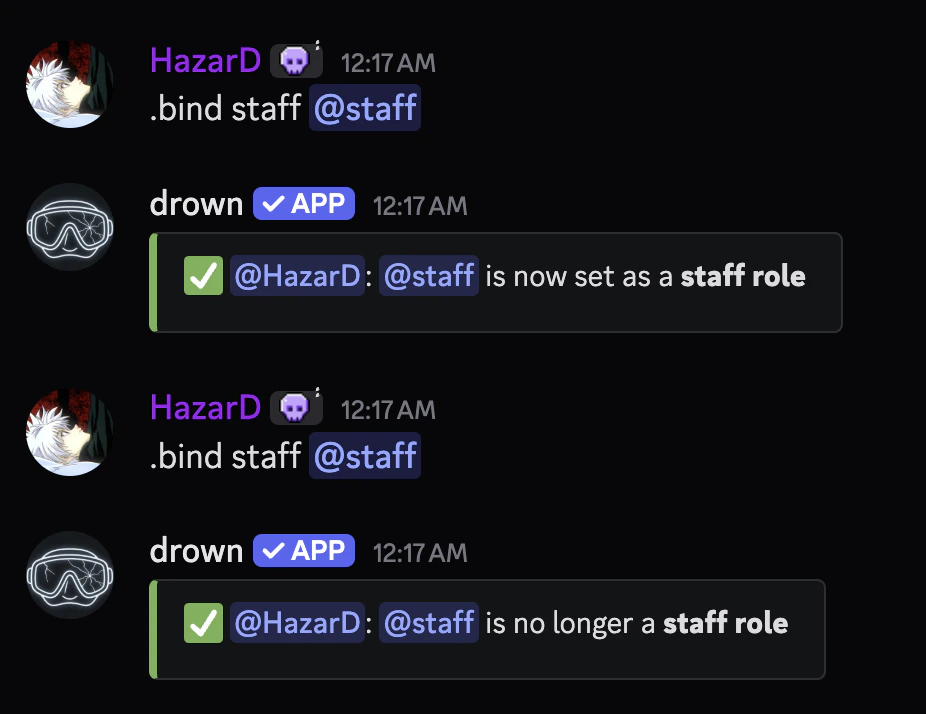
It’s important to set the staff roles in your server to ensure that bleed can identify who has dangerous permissions. This is necessary for the `stripstaff` punishment to work.\
Use the `.bind staff @role` command to set a role as a staff role, you would re-run the command if you don’t want a role set as staff anymore.
You can view set staff roles with the `,bind staff list` command.
 ### Invoke Messages
You can customize the response for moderation commands which is by default `👍` and the direct message which will be sent after punishing the user.
The following moderation commands can be customized:
* `jail`, `kick`, `ban`, `tempban`, `softban`, `hardban`, `timeout` & `warn`.
The `message` parameter can be raw text or an **embed** with dynamic **variables**.
```typescript Syntax theme={null}
.invoke (command) message (message)
.invoke (command) dm (message)
```
```typescript Example theme={null}
.invoke jail message {user.mention} has been jailed for {reason}
.invoke jail dm you have been jailed for {reason}
```
### Invoke Messages
You can customize the response for moderation commands which is by default `👍` and the direct message which will be sent after punishing the user.
The following moderation commands can be customized:
* `jail`, `kick`, `ban`, `tempban`, `softban`, `hardban`, `timeout` & `warn`.
The `message` parameter can be raw text or an **embed** with dynamic **variables**.
```typescript Syntax theme={null}
.invoke (command) message (message)
.invoke (command) dm (message)
```
```typescript Example theme={null}
.invoke jail message {user.mention} has been jailed for {reason}
.invoke jail dm you have been jailed for {reason}
```